Tuesday, 4 September 2012

// // Leave a Comment

Root Galaxy Fit Quick n Easy


 One of the most sort of the range smart phones, the Samsung Galaxy FIT which is not only on of the affordable smart phones but also is the smart phone with which you can make the most out of it. So, on the lines of this thought let’s check out on how you can easily root your phone which isSamsung Galaxy FIT S 5670 so that you can then think of possibilities in the form of installing the Custom ROMs as well as in the form of accessing the system level files which otherwise are not accessible without rooting the phone.
The only sad part about this whole process is that rooting basically voids the warranty, though again the best part is that the rooting process which will be employed on this phone is a truly reversible process. Since, it’s a reversible process, you can revoke the root access at any point of time as soon as you follow the procedure to update with the Stock ROM. Please note that this process of rooting is applicable for all the phones which are on Froyo operating system as well as on all the Gingerbread phones across the Globe and also this can be followed by all those whose phones are network locked too.
It’s very important to follow each and every single instruction which is mentioned below. For your convenience, we have broken this article into different pages and also all the download files which needs to be downloaded are mentioned clearly in the procedure section. So let’s check out on what are the list of pre requisites which you need to refer before rooting the phone and then followed by the actual instructions to root the phone are mentioned below.
Pre Root Instructions:
  • So, before you proceed for the actual instructions you need to ensure that all the data which is present in your  to be  phone backed up so that just in case if you lose this data then you will be in a position to restore all of them back.
  • So all in a nut shell you will have to move all your audio, Video and image files to your external SD card and then all your contacts and SMS can be backed by following the below mentioned links.
  • Now, ensure that you have a minimum battery of at least greater than 60% as it’s necessary to maintain this limit so as to avoid from the battery calibration.
  • It is very important to note that you have followed all the instructions carefully which includes the disabling of the Antivirus suites in your PC before proceeding to follow the instructions to root the phone.
  • Also, additionally you will have to also ensure that you have noted down all the APN and MMS Settings which are available  in the path of “Applications > Settings > Wireless and Network > Mobile Networks > Access Point Names” which then you can note down all the settings by tapping on the MMS, GPRS or 3G Settings. You can restore all these APN as well as MMS settings once the rooting process is finished so as to access the same.
Procedure to RooT Samsung Galaxy FIT:
  • So, once you are done with the above instructions, its now time to download rooting firmware********* **CLICK TO DOWNLOAD ROOTING FIRMWARE** CLICK HERE **** to your computer. Please note that after downloading this file you need to place the same or transfer the same to the desktop of your PC so that you can easily find the same.
  • Once, the file is downloaded and moved to desktop, you now need to copy the same to your phone. Ensure that you are not placing this file deep into the sub / root folders or else it will be difficult to locate the same. Now, place this file into your phone, you will have to connect the Galaxy FIT S 5670 to the computer using the USB cable which you got at the time of purchasing the phone.
  • As soon as the file is copied / placed successfully into the phone, you will then have to remove the USB cable and then you will have to turn Off the phone so that you can then enter into the recovery mode so that the rooting file can be executed. To enter the recovery mode, you will have to press the Menu Button and then you will have to Press the Power button simultaneously to enter into the recovery mode. Also, additionally note that if the device boots in the normal mode with the home screen then you will have to again switch off the device and retry the process.
  • Next up in the recovery mode, you will have to choose the option of “update from SD card” after which you will then have to select the file which you placed the same in your phone which is having the name of “GalaxyFIT_RootingPackage.zip”. Choose the same and then the process of rooting will be initiated. Please ensure that in the process of rooting there will be incidents like screen flickering and your device may also be restarted in the process of rooting, so don’t panic and interrupt the process of rooting.
Galaxy S Recovery Mode 
  • So, as soon as the rooting is finished, you need to select the option of “reboot system now”after which the phone will be rebooting. After the phone reboots, you will find applications like the Superuser which is in the Skull shaped icon and also another application called CWM which is nothing but the Clock Work Mod Recovery application. Just in case if these two apps are not there in the applications, then that means the rooting was not done successfully and you need to repeat the above process again.
That’s it, so now you have successfully rooted the Galaxy FIT. Do, let us know just in case if you face any issues while rooting the phone in the comments section below.
Read More

Friday, 24 August 2012

// // Leave a Comment

Six Guns Android All Devices


Discover a wilder West than you ever imagined. Play for free, make the enemy pay
Explore a truly enormous and open Wild West frontier full of cowboys, bandits and more…unnatural enemies in this third person shooter adventure game.
Play for free: Make your enemies pay!
Buck Crosshaw never shot a man who didn’t deserve it, but now he’s an outlaw who had to fake his own death and escape to Arizona. But in escaping one evil, Buck is about to face another, for an ancient and wicked force stirs in the hills of this mysterious region.
A WILD FRONTIER
Freely explore an open world set in Arizona and Oregon full of events, mystery and challenges for you to discover as you become completely immersed in the story and the action. But don’t be fooled by this land’s beauty - outlaws, vampires & many other unnatural foes lurk in every shadow.
ACCEPT THE CHALLENGE
Take on 40 missions with a great variety of tasks for you to overcome. You’ll race horses, take out robbers, fend off waves of enemies and more along the way!
SADDLE UP
In this kill-or-be-killed land, you’ll need to unlock all 8 different horses, 19 weapons and a wide selection of clothes, ammo and other items to help you on your adventure.
PLAY FOR FREE
Free games have never been this deep or fun! It costs you nothing to download and play the game to the end!

**Instructions*** :-
1)Install apk put data in sd/gameloft/games


2)Turn on internet so it will verify your data
3)U need toDownload3mb more 
Download Apk

Download Data Part 1
Download Data Part 2
Read More

Thursday, 23 August 2012

// // Leave a Comment

Ram Manager Pro


This application is the best solution for all who have problem with free memory, with multitasking, with slow swapping between applications or with slow performance of your device. I recommend to use this application to everybody who wants have better phone, because this application increases speed of your phone and other parameters which depend on RAM.

ROOT IS REQUIRED!!!
EACH ROOT USER MUST HAVE THIS APPLICATION!
PLEASE, IF YOU FIND A BUG OR IF YOU HAVE SOME PROBLEM, CONTACT ME BEFORE YOU GIVE LOW RATING AND I WILL TRY TO HELP YOU AND SOLVE YOUR PROBLEM.

ADVANTAGES OF PRO:
★NO ADS
★More features
★Widget
★Faster support
★More frequent updates
★You can support development

Download Link
Read More

Sunday, 19 August 2012

// // Leave a Comment

Captain America Android Download


Play as Captain America the First Avenger. Stop the Red Skull!
Sentinel of Liberty features stunning HD graphics! Play as the Super Soldier Captain America in this epic action game. As WW2 rages, Red Skull is leading HYDRA as they build super weapons that will turn the tide of the war. To make matters worse, Falsworth, Dum Dum Dugan and Bucky have been captured. Go behind enemy lines to rescue them and put an end to the sinister plot. Use your unbreakable shield to battle, block, and maneuver your way on what seems like a suicide mission.
SUPER SOLDIER ACTION
Unleash epic combat moves as you take down HYDRA soldiers! Shield slide to traverse difficult terrain, perform takedowns in mid-air or on the ground, and launch your shield for long-range attacks.
TOUCH VISUAL POWER
Spectacular graphics and precise touch controls combine to give Sentinel of Liberty fluid cinematic action. Execute wall runs, slide under traps, and unleash devastating combo attacks with dynamic intensity you can feel.

Download Link
Read More

Wednesday, 15 August 2012

// // Leave a Comment

Flash Player 10.2 For All Devices (from galaxy y to SIII)

*****HII GUYS THIS TIME I AM UPLOADING GEM FOR DEVICES LIKE ACE,FIT,Y ETC....
THE MOST-WANTED FLASH PLAYER!!!!!!!
INSTALL THIS AND YOU WILL GET FLASH SUPPORT 4 YOUR CELL


If you have been a regular visitor of Android Campus you must know about the earlier version Flash Player 10.1 we have provided to ARMv6 android user which changed the game of the whole android enthusiast's  community .  Now we are here with a new and more stable version of Flash player 10.2 , featuring more smoother experience of flash over the internet. now the new flash player supports even more android devices but still devices need to have custom roms as earlier app demanded to run it smoothly. Though you can also find the latest version of 10.3 over the internet but we don't recommend it to anybody because it is even more worse then 10.1, and we have tested all the 3 version of flash and 10.2 is the most smoothest off all.


The new version of flash player comes packed in with some set of improvements like :- 

  • Better app compatibly
  • Now support more armv6 devices
  • Comes in with Hardware Acceleration
  • More smoother Experience while browsing the internet
  • YouTube now works Flawlessly
  • Richer graphics and more FPS in animations
  • A lot faster the version of flash then 10.1
  • Now support Playing small games which do not overload processors

***Download Link***
Read More

Tuesday, 14 August 2012

// // Leave a Comment

Power Amp Full Version


Powerful Music Player for Android
Poweramp is a powerful music player for Android.
Follow us on twitter @Poweramp2 to get instant updates on app development progress, feature spotlight, theme sharing, take part in giveaways and even chances for free copies of Poweramp.
Please check Common Questions/Answers below in the description.
You can downgrade back to 1.4 by downloading it from official Poweramp site.
Key Features:
- plays mp3, mp4/m4a (including alac), ogg, wma*, flac, wav, ape, wv, tta, mpc, aiff (* some wma pro files may require NEON support)
- 10 band optimized graphical equalizer for all supported formats, presets, custom presets
- separate powerful Bass and Treble adjustment
- stereo eXpansion, mono mixing, balance
- crossfade
- gapless
- replay gain
- plays songs from folders and from own library
- dynamic queue
- lyrics support, including lyrics search via musiXmatch plugin
- embed and standalone .cue files support
- support for m3u, m3u8, pls, wpl playlists
- OpenGL based cover art animation
- downloads missing album art
- 4 configurable widget types
- configurable lock screen with optional Direct Unlock
- headset support, automatic Resume on headset and/or BT connection (can be disabled in settings)
- scrobbling
- tag editor
- visual themes, including support for external/3rd party skins
- fast library scan
- high level of customization via settings
This version is 15 days full featured Trial. See Related Apps for Poweramp Full Version Unlocker or use Buy option in Poweramp settings to buy Full Version.
====
Full Changelog for 2.0.6-build-508
- fixed issue with HTC Sensation XL @ ICS
- smoother post-notification resume
- some bluetooth track info support (where supported by device/stock player – Motorolas and Samsungs). Optional album/artist can be included into title for title-displaying-only BT devices (Settings/Misc/Tweaks)
- polished widgets for various devices/ROMs
- stability improvements
- improved notification controls
- added HTC Sound Enhancement support (HTC FX @ Tone/Vol screen, doesn't work on HTC One X)
- German (thanks to Vincent T.)
- Italian (thanks to Luigiantonio Calò)
- Spanish (thanks to Luis Gallón, Jose Martin)
- Chinese Traditional (thanks to Jane Zhang, KaiChing Chang)
- HTC One X support
- Meizu MX support
- support for Dolby effect on HTC DHD
- settings revamp
- action bars support for Honeycomb/ICS
- additional action bars options for ICS
- improved build-in skins for tablets
- background folders scan
- additional scanning options
- added workaround for rare Samsung CPU related crash
- few other bug fixes and improvements
====
Common Questions/Answers for Poweramp v2.x:
Q. My songs are missing from folders/library.
A. Please ensure you have all your folders with music actually checked in Poweramp Settings => Music Folders.
Your original Android Library is not changed, nor any files deleted.
Poweramp library is a separate, completely independent library. When you installed Poweramp 2.0, it just got filled with the files scanned from your sd card/other flash memory, as specified in Music Folders.
Q. Freeze/too slow folders/library scan
A. You have (semi)broken SD card. Please check your SD card for errors on computer or try another SD card.
Q. Volume too low. Volume changes weirdly. Other volume issues.
A. Try to disable Direct Volume Control in PowerAMP Settings => Audio Engine => Advanced Tweaks.
Instructions :
1)Install Poweramp v2.0.5-build-488.apk (Don't run!)(Clear Data)
2)Install PowerAMPunlocker.apk (Don't run!)
3)Install LuckyPatcher (Run, Custom patch, add this patch to Bootlist, Patch on reboot - Custom patch) Download Lucky Patcher
Run Poweramp.
Read More

Monday, 13 August 2012

// // Leave a Comment

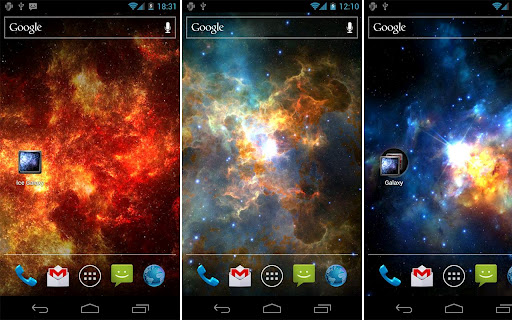
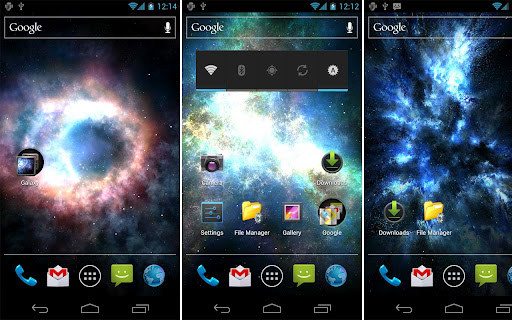
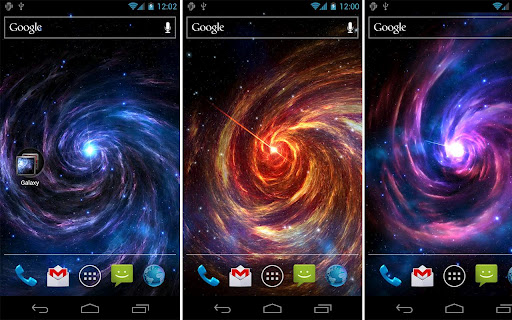
Galaxy Pack


 Discover Galaxies and Nebulas in 3D, realtime and OpenGL.
After the discovery of a series of four galaxies: Inferno Galaxy, Ice Galaxy, Shadow Galaxy and Galaxy Vortex...
... waiting to be explored further nooks of the Universe!
On the horizon appeared a new Galaxies:
1. Red Dragon Galaxy
2. Hydra Galaxy
3. Small Cloud Galaxy
4. Pegasus Galaxy
5. Colossus Galaxy
6. Cyclop Galaxy
7. M101 Galaxy (Update 1.1)
8. Hextor Galaxy (Update 1.2)
9. Hydrogen Clouds (Update 1.3)
10. Inferno Clouds (Update 1.3)
11. Primaeval Galaxy (Update 1.4)
Each of them you can view in 3D, in realtime, in OpenGL.
Check out what is in each of them. Adjust the settings, change them.
OPTIONS :
+ Set Predefined Galaxies (11 avaiable now)
+ Set Background type (5 avaiable now)
+ Set Core type (3 avaiable now)
+ Set Stars type (3 avaiable now)
+ Set Stars count (for max speed reduce stars)
+ Set X-Ray type, on/off (default off)
+ Set Stars on/off

UPDATE 1.5
+ Fixed Galaxy S3 issue. Wow, fantastic speed !
UPDATE 1.4
+ NEW Galaxy : Primaeval Galaxy
+ Stars on/off fix
+ link to Planest Pack
UPDATE 1.3
+ 2 NEW Galaxy : Hydrogen Clouds, Inferno Clouds (updated)
+ NEW Option Stars on/off in all Galaxies
+ Smaller stars
+ On big screens like tablets or Nexus,
finger moves galaxy faster
UPDATE 1.2
+ 1 NEW Galaxy : Hextor Galaxy
+ NEW option : X-Ray from Galaxy center(default OFF)
+ ICS update (Nexus), new look for Colosus and Cyklop G.
UPDATE 1.1:
+ 1 NEW Galaxy : M101 Galaxy
+ 2 NEW Backgrounds types (more natural)
+ NEW option : Galaxy rotation speed
+ NEW option : Galaxy Core Size
+ NEW option : Galaxy Core On/Off
+ Stars count from 15 to 100

TIPS:
+ Attention : option 'Move to SDCard' is ON, you may move wallpaper to SDCard, but in some phones this not work. If not work, move back wallpaper to 'Phone Memory' . ( Default is 'Phone Memory' )
+ For save battery and LCD display, set new 'M101 Galaxy' with 'Stars' background
+ For more smoth animations reduce number of stars 'Stars Count' in options menu, and speed increase !
+ For save battery and CPU set '50% save' in options menu
Download Link
Read More